Killington GIS Viewer — Software Architecture
Author: Phillip Sweeney (phillipjsweeney@gmail.com) with Google DeepMind / Anthropic Opus 5.5.
Architecture Style: dbserver pattern (Node.js/Express, flat-file JSON tables, dark theme UI, model-viewer GLB streaming, GCP App Engine Standard).
Technology Stack Summary
| Layer | Component | Specification & Details |
|---|---|---|
| Server Runtime | Node.js 22.x + Express 4.21 | REST API routes, static file streaming, sanitized configuration endpoints |
| GIS Engine | Leaflet.js 1.9.4 | Multi-layer engine: Standard OSM, Clean Terrain, ESRI Satellite, USGS Topo |
| Google Maps | Google Maps JavaScript API | Terrain mode with custom natural styling, GPS course lines & polygons |
| 3D Mesh Viewer | Google <model-viewer> 3.5.0 | WebGL / WebGPU PBR renderer for high-resolution 3D terrain meshes (GLB) |
| DEM Elevation Source | AWS Open Data Terrarium / USGS 3DEP | 1-meter resolution elevation grids, keyless automated download fallback |
| Elevation Pipeline | Python 3.13 (rasterio, trimesh, PIL) | GeoTIFF downsampling, normal calculation, vertex coloring & GLB export |
| Database Layer | Flat JSON files (/database/) | db-trails.json, db-settings.json (Zero external DB dependency) |
| Hosting Target | GCP App Engine Standard | runtime: nodejs22, project mkatlabs, service killington |
| Diagramming | Mermaid.js (Dark Theme) | Live client-rendered system flowcharts, DFDs, and ER diagrams |
System Architecture Diagram
Data Flow Sequence (DFD)
News Feed, Mountain Cam and Visits Architecture (2026-11-16)
Daily data is made on the PC by scheduled tasks, kept as flat JSON by date, and read by the site through one small store
(utils/store.js: the data/ folder on the PC, the project bucket on App Engine). Nothing is deleted or overwritten.
daily 06:15] WS[webcam_snapshot.py
sunrise +45 min, sunset -30 min] BT[build_teamstats.py] BS[build_stories.py] end subgraph Stores flat JSON ND[(data/news/DATE.json)] WD[(data/webcam/index.json + pictures)] TS[(database/db-teamstats.json)] ST[(database/db-stories.json)] VD[(data/visits/DATE/instance.json)] end subgraph Site server.js + utils/site-data.js AN[GET /api/news] AW[GET /api/webcam] AV[POST /api/visit
GET /api/admin/visits] end subgraph Pages TK[News ticker on every page] NP[news.html] WP[webcam.html + LIVE MOUNTAIN] TP[team-stats.html + teams.html] AP[admin.html Dashboard] end GN --> FN --> ND --> AN --> TK AN --> NP TS -. racer names and teams drive the searches .-> FN KW --> WS --> WD --> AW --> WP FIS --> BT --> TS --> TP WEB --> BT WEB --> BS --> ST --> NP ST --> TK TK -. every page load .-> AV --> VD AV --> AP
| Feed | When | What is kept | How a headline is sorted |
|---|---|---|---|
News (scripts/fetch_news.py) | Every morning 06:15, one file per day | Headline, source, link, date. No article text. | Searches: the event; the last race and the next three; every racer with a biography and each team's two best scorers. Topic: killington, races, stories (family, comeback, interview, video ...) or teams. Teams and racers are tagged by matching the racers' surnames. |
Mountain Cam (scripts/webcam_snapshot.py) | 45 min after sunrise and 30 min before sunset (computed for Killington) | Page picture + thumbnail + one record per picture | id = date (morning) or date_evening |
Team data (scripts/build_teamstats.py) | After each race | One row per starter per race, from the FIS sheet | Standings, start order, team totals and each racer's season are worked out from the rows, never stored twice |
| Visits | Every page view | Time, page, IP, place, referrer, browser, bot flag | One file per day; admin only |
Entity Relationship Diagram (ERD)
Every store of the site and how they connect, generated from the real data files by
scripts/make_erd.py (field names = the first record of each store). Lines are right-angled;
the ends show the cardinality: | one, o zero, crow's foot many.
Versioned: docs/erd_vN.svg, older versions kept.
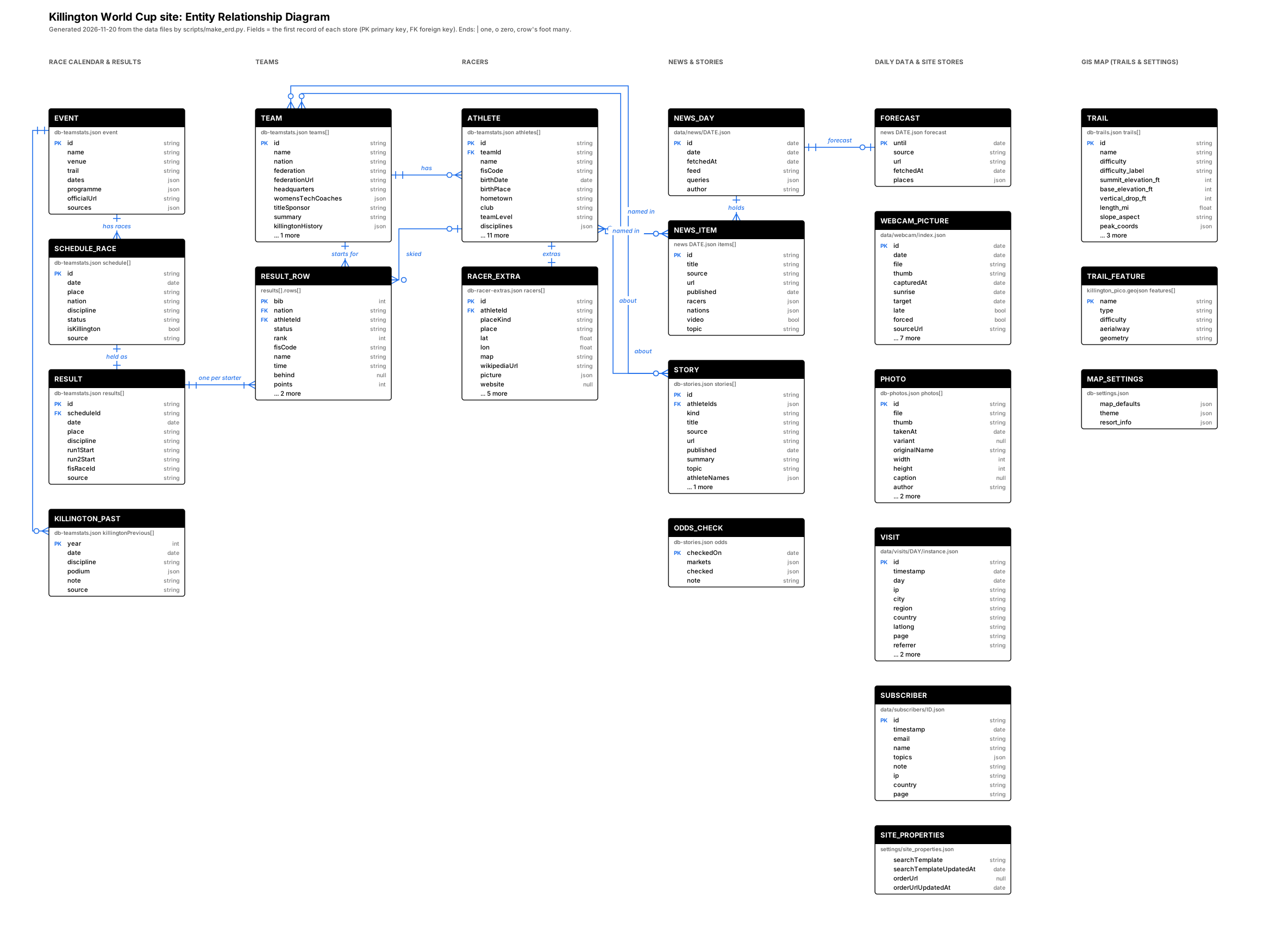
Team and racer names come from the FIS result sheets (125 racers, 32 teams after the first two races); 30 racers also have a researched biography.
Field lists: docs/requirements.md (Data).
Superstar World Cup Coordinates Specification
| Feature | South / West Corner | North / East Corner | Visual Styling |
|---|---|---|---|
| Superstar World Cup Course Line | 43.60722, -72.80242 (Finish) | 43.61771, -72.80206 (Start Gate) | Hot Pink (#ff1493) with fluorescent glow |
| Superstar Trail Quad | S: 43.60704, W: -72.80456 | N: 43.61771, E: -72.80027 | Red Boundary (#ff4444) |
| Superstar Event & Race Area | S: 43.60655, W: -72.80678 | N: 43.61774, E: -72.79828 | Orange Dashed Area (#ffaa00) |
| Pico Ski Area Bounds | S: 43.62200, W: -72.85200 | N: 43.63800, E: -72.83500 | Cyan Dashed Area (#00ccff) |